
Passport & ID Photo Maker
Crop photos to passport and ID sizes, change the background, make 4×6 sheets.

When you need it
You need a passport or ID photo today, and cropping a phone photo to the exact size and pixels is harder than it should be.
Screenshots
What it does
Only what you need
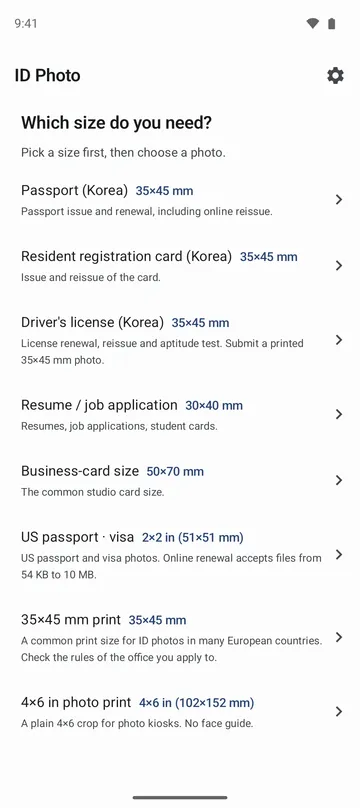
- Crop to US passport and visa 2×2 in, a 35×45 mm print, Korean passport, ID and license 35×45 mm, a 30×40 mm resume photo, 50×70 mm, or a 4×6 in print.
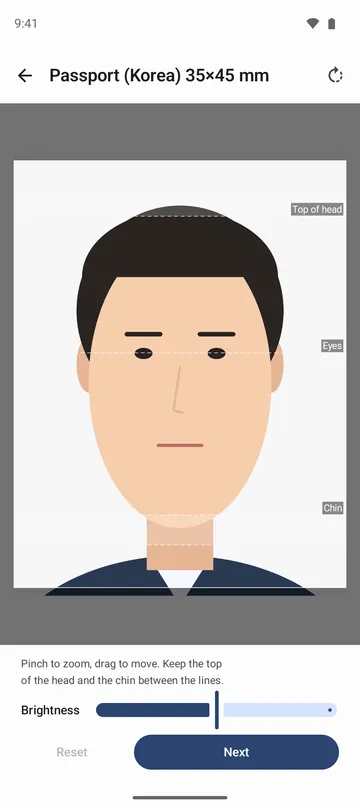
- Zoom and move the photo inside a frame locked to the size, with guide lines for the top of the head, eyes and chin. Rotate by 90 degrees and adjust brightness.
- For ID, license, resume, 50×70 mm and 4×6 in sizes, change the background to white, light blue or gray. The app separates you from the background on this device and repaints only the background.
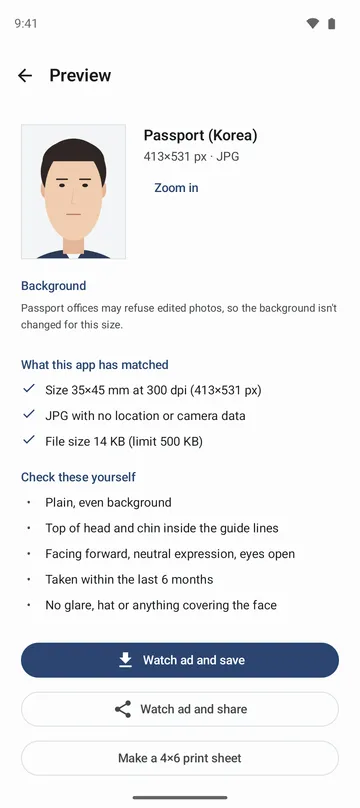
- Save as a 300 dpi JPG with no location or camera data. A Korean passport file comes out at 413×531 pixels and under 500 KB.
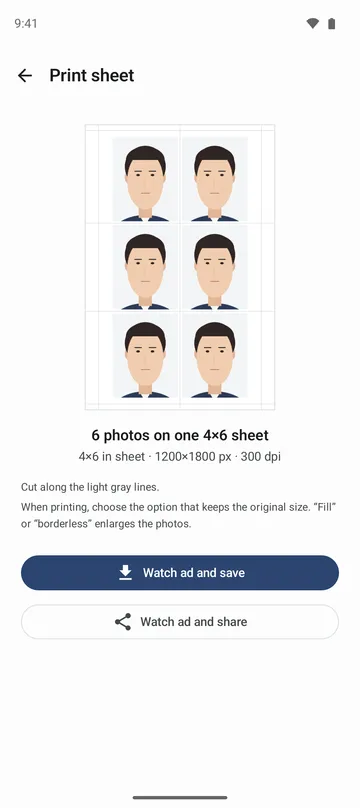
- Lay out several copies on one 4×6 print sheet with light cut lines, ready for a photo kiosk or print shop.
How to use it
Done in 5 steps
- Open the app and pick a size under Which size do you need?
- Tap Choose a photo to use one from your phone, or Take a photo to open your camera app.
- Pinch to zoom and drag to move until the top of the head and the chin sit between the lines, then tap Next.
- On the preview, read What this app has matched and Check these yourself. Pick a background if you want one, then tap Zoom in to check the hair edges.
- Tap Save, or tap Make a 4×6 print sheet if you plan to print.
What it doesn't do
Good to know before you install
- It matches the size, pixels and file format only. The background, head size, expression and when the photo was taken depend on your photo, and the app doesn't check them.
- Passport and 35×45 mm sizes keep the original background, because offices may refuse edited photos.
- Rules change, and some offices don't accept edited photos. Check the latest guidance from the office you are applying to.
- It is not made or run by any government agency. Sizes follow official guidance from the U.S. Department of State and Korean government sources.
FAQ
Do I need to allow the camera or photo library?
No. The app only receives the one photo you pick in the system photo picker or take with your camera app.
Are my photos uploaded?
No. Photos are processed only on this device, and working copies are deleted when you go back to the start screen.
Does it retouch my face?
No face recognition and no retouching. Only a background change separates you from the background, on this device, and that result is not kept or sent.
I changed the background, but the original came back.
If the app can't separate you from the background cleanly, it keeps the original. A photo taken straight on in front of a plain white wall works best.
Can I use it for a US passport online renewal?
It makes a 2×2 in, 600×600 pixel file. Online renewal accepts files of 54 KB or more, and the app tells you if yours comes out smaller.
My print sheet came out bigger than expected.
When printing, choose the option that keeps the original size. Fill or borderless options enlarge the photos.
Get the app
Passport & ID Photo Maker
Crop photos to passport and ID sizes, change the background, make 4×6 sheets.