
EXIF Viewer: Remove Location
See what your photo reveals and copy it without location. Videos too.

When you need it
Before you send a photo, you want to know if it shows where it was taken, and to remove that without touching the original.
Screenshots
What it does
Only what you need
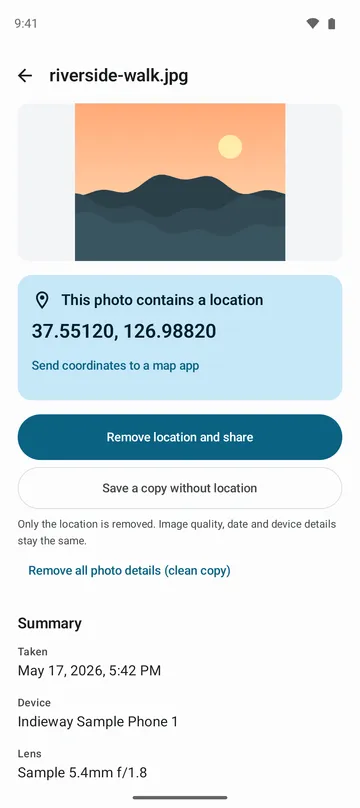
- Tells you first, in plain words, whether a photo contains a location, and shows the coordinates if there are any. Pass them to a map app when you choose to.
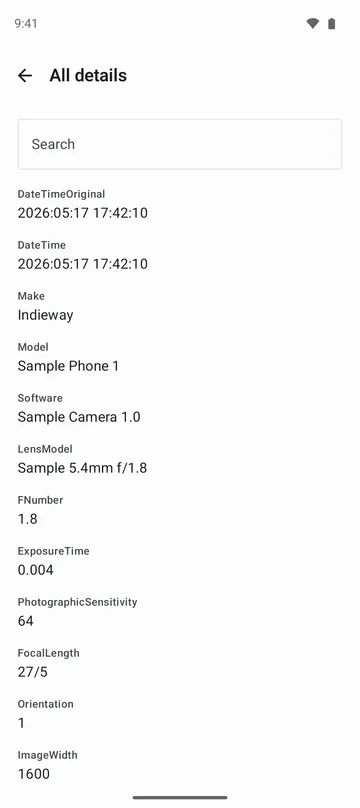
- Shows when it was taken, which device and lens took it, and its size, plus a full list of the details that could be read, with search.
- For JPEG photos, makes a copy with only the location removed. The picture is not compressed again, so quality stays the same, and the date and device details stay too.
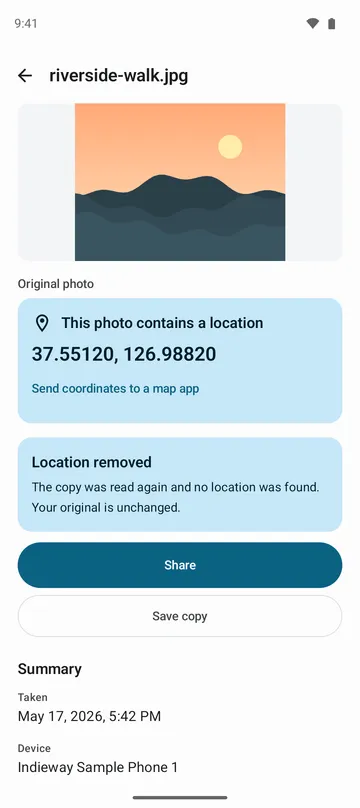
- After removing, the copy is read again to check that the standard location fields are gone. If that check does not pass, nothing is saved or shared.
- HEIC, PNG, WebP and other formats get a clean copy that keeps only the picture, and MP4, MOV and 3GP videos can have their location removed too.
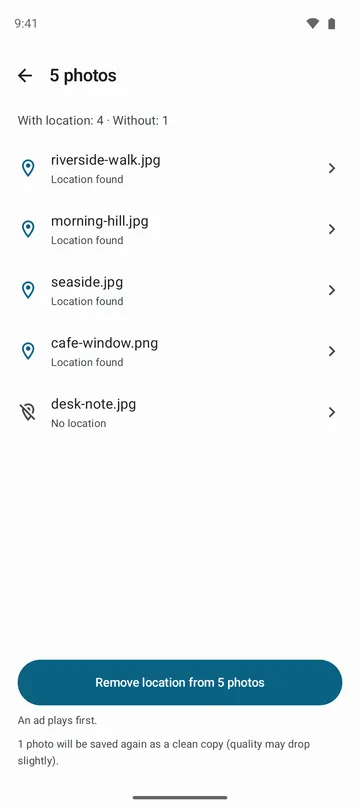
- Choose up to 50 photos at once, and see which ones contain a location before you start.
How to use it
Done in 4 steps
- Tap Choose photos or a video on the home screen, or send them from your gallery with Share.
- Check the line at the top to see whether there is a location, and open All details for the full list.
- To send it without the location, tap Remove location and share. To keep a copy, tap Save a copy without location.
- To leave out all photo details, tap Make a clean copy so only the picture stays.
What it doesn't do
Good to know before you install
- Things visible in the picture itself, such as signs, landmarks or watermarks, stay in the picture.
- Remove location clears the standard location fields and does not open maker notes. If that matters to you, make a clean copy.
- The app can't change the date or add a location.
- Videos that record a location track while filming, and fragmented MP4 files, can't be fully cleaned, so no copy is made.
FAQ
Does the app change my original photo?
No. The original photo is not changed or deleted. The version without location is saved or shared as a copy.
Does removing the location lower the quality?
For JPEG, removing the location does not compress the picture again, so quality stays the same. A clean copy is saved again as JPEG and may lose a little quality, while PNG stays PNG.
The app says there is no location, but I know where I took it.
Android may have hidden the location when handing the photo over. The app asks once for your approval to read it. You can remove the location even without allowing it.
Does it remove the location from photos I already posted?
No. Copies you already posted elsewhere are not changed. Use it on photos before you send them.
Are my photos uploaded anywhere?
No. Only the photos you choose are read and processed on your device. Photos and their details, including coordinates, are not uploaded, and the app keeps no history of the photos you opened.
Get the app
EXIF Viewer: Remove Location
See what your photo reveals and copy it without location. Videos too.